Teams and organisations
For any company where people share skills and agents across teams: engineering teams running coding agents in a software factory, and data, support and operations teams too.
What changes
Once many people and agents use a skill, and it keeps changing, four jobs follow.
| Job to be done | Experience today | With an agent registry |
|---|---|---|
| Give everyone the same skills and agents | Every team member has their own slightly different copy of each skill and agent, in each tool they use | Everyone has the same version in every coding agent, synced from one registry your company owns |
| Ship a fix everywhere | You fix a skill, then chase people across teams to copy it in, and some never do | You publish the fix once, and every project picks it up on its next update |
| Control what agents follow | Anyone can change instructions that every agent then follows, and a bad edit reaches everyone before anyone notices | A teammate reviews every change first, and each project stays on the last good version until it chooses to update |
| Know what an agent ran | When an agent gets something wrong, you can't tell which version of a skill it was following | You can look up the exact version every project used, and CI tells you when a project changes |
How it works
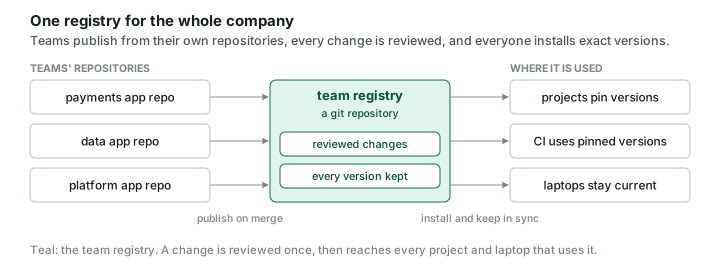
Teams publish skills from their own repositories when a change merges. The registry reviews each change as a pull request. Projects and CI install exact versions, and every laptop picks up new versions in the background.
Walk through it
The steps below build a team registry named acme, with one namespace per team. Install the aireg CLI first, as in the Quickstart.
1. Create the team registry
For a new registry, create a folder named acme-registry and initialise it. This registry can hold your team's skills and agents, with one folder per namespace.
mkdir acme-registry && cd acme-registry && git init
aireg registry init --name acme --namespace engineering -y
git add . && git commit -m "start the acme registry"
gh repo create acme/ai-registry --private --source . --push
--name sets the registry's name, which is also how others refer to it. --namespace creates a folder for one team's artifacts; repeat it to create several. -y takes the defaults instead of asking. gh repo create pushes the registry to GitHub as acme/ai-registry, where the later steps read it; use your own organisation's name, or push it to any git host your team uses.
To convert an existing skills-only repository in place, preserve uncommitted work and use a conversion branch. Inspect registry.json, index.json and the destination artifacts/ paths first; init overwrites index.json, so resolve unrelated existing content with the owner before initializing. Extend an existing registry instead of reinitializing it. Then run aireg registry init --name acme --namespace engineering -y in its checkout instead. Keep its existing GitHub repository and history; skip mkdir, git init and gh repo create. Import the existing skill folders in step 2. Application repositories can keep authoring skills alongside their code and publish to a separate registry, as in step 3.
2. Bring in the skills teams already have
You can use the aireg CLI to find any skills that exist across your harnesses that aren't managed, and bring them into the registry so you can manage them centrally.
aireg status -g
aireg skill new --from ~/.claude/skills/pr-review ~/.claude/skills/lint --namespace engineering
aireg status -g lists unmanaged skills in your user scope; inside a project, aireg status does the same for the project. A row can group copies from several harnesses, so inspect every target harness folder too. aireg skill new --from copies existing skill folders into the namespace you name, each as version 0.1.0 of a new skill, and leaves the originals where they are; run it from the registry folder. For an in-place conversion, use the repository paths, such as skills/pr-review, instead of the user-scope paths above.
Before retiring any originals, compare each imported skill and its supporting files with the source. Import skips hidden files and directories; decide how to preserve any needed content and check links, scripts and installers that use the old paths. Run aireg registry index and aireg registry validate. Offer one conversion pull request that also removes the redundant source folders, updates their consumers and leaves a README pointer to the registry and its editing workflow. Get approval before removing folders. If moving a skills-only repository to a separate registry, offer a README pointer and archive the old repository only with explicit approval after its consumers have migrated. Keep application-repository authoring sources used by step 3.
3. Publish from application repositories
Teams often write skills inside the application repository where they use them. In CI, each new or changed skill is published into a checkout of the registry when it merges, and opened there as a pull request, so the registry stays the one place to find them without anyone working in the registry repository.
name: publish-skills
on:
  push:
    branches: [main]
    paths: [".claude/skills/**"]
permissions:
  contents: read
jobs:
  publish:
    runs-on: ubuntu-latest
    steps:
      - name: Check out this repository
        uses: actions/checkout@3d3c42e5aac5ba805825da76410c181273ba90b1 # v7.0.1
      - name: Check out the registry
        uses: actions/checkout@3d3c42e5aac5ba805825da76410c181273ba90b1 # v7.0.1
        with:
          repository: acme/ai-registry
          path: registry
          token: ${{ secrets.ACME_REGISTRY_TOKEN }}
          persist-credentials: false
      - run: curl -fsSL https://aireg.sh/install | AIREG_VERSION=0.1.7 sh
      - run: aireg publish '.claude/skills/*' --to ./registry/engineering --yes
      - uses: peter-evans/create-pull-request@5f6978faf089d4d20b00c7766989d076bb2fc7f1 # v8.1.1
        with:
          path: registry
          token: ${{ secrets.ACME_REGISTRY_TOKEN }}
          title: Publish skills from ${{ github.repository }}
The quoted '.claude/skills/*' lets the CLI find every skill folder itself. --to ./registry/engineering names the registry checkout and the namespace to publish into, and --yes skips prompts. aireg writes the new versions and the index into the checkout; git and the pull request action take them from there, as aireg doesn't push to git registries. ACME_REGISTRY_TOKEN needs write access to the registry repository's contents and pull requests; the workflow's own token only reads.
4. Review every change
Check every pull request to the registry, so a change that edits a released version or leaves the index out of date cannot merge.
on: pull_request
permissions:
  contents: read
jobs:
  validate:
    runs-on: ubuntu-latest
    steps:
      - uses: actions/checkout@3d3c42e5aac5ba805825da76410c181273ba90b1 # v7.0.1
      - run: curl -fsSL https://aireg.sh/install | AIREG_VERSION=0.1.7 sh
      - run: aireg registry validate
aireg registry validate exits with an error when it finds a problem, and names the fix for each one. It compares released versions with the pull request's target branch, which GitHub Actions names in GITHUB_BASE_REF, and fetches that branch's latest commit itself, so the default checkout, one commit deep, is enough. Make validate a required status check in the registry repository's branch protection or ruleset, so a pull request that fails it can't merge.
5. Check a skill before rollout
Read a skill before you roll it out, to see exactly what it tells an agent to do. This is an aireg CLI command that installs nothing.
aireg registry add github.com/acme/ai-registry -g
aireg show acme/engineering/pr-review
aireg show ~/.claude/skills/lint
The first command connects the registry to your user scope, once per machine. The address names the registry, namespace, and skill; add the kind, as in acme/engineering/skill/pr-review, only when a skill and an agent share the name. A path works too, for a skill you have not published yet. aireg show prints the artifact and writes nothing.
6. Pin projects and CI to exact versions
Roll a skill out to one project at a fixed version, so every teammate and every CI run gets exactly the same skill. Run these in the project, not in the registry:
@0.1.0 pins the version, so aireg update leaves it alone. The CLI records what the project uses in .registry/manifest.yml and the exact versions and digests in .registry/manifest.lock.yml, and keeps the installed copies in .registry/artifacts/; commit .registry/ and the harness folders it links into, such as .claude/. None of it makes the project a registry: only a folder holding registry.json is one. In CI, aireg install --frozen fails rather than change anything, and aireg status exits 3 if the installed skills no longer match the lockfile.
7. Keep every laptop current
Install a namespace for every project on your machine and let the aireg CLI keep it up to date, so new skills and new versions reach Claude Code and Codex without you running a command. For a conversion, wait until its pull request merges and the remote default branch serves the registry before moving active copies. Every teammate first checks for hand-installed copies of the incoming skills in every target harness folder, including ~/.claude/skills and ~/.agents/skills. Compare them with the registry versions and preserve local changes, then move the matching folders to a backup outside all harness discovery paths with their owner's approval. Do this even if the teammate did not create the registry. aireg add -g does not replace their folders, so an old copy can remain active while another harness receives the registry version.
aireg registry add github.com/acme/ai-registry -g
aireg registry show acme
# Confirm the expected namespace and artifacts are available.
aireg status -g
# Review and move old copies outside every target harness before installing.
aireg add -g acme/engineering
aireg status -g
aireg daemon autostart on
After installing, confirm every intended harness uses the registry-managed skills and resolve any skipped or blocked placements; a successful command alone does not establish this. Do not publish an old local copy just to clear a collision.
-g installs into your user scope instead of the current project, so every project on your machine gets the skills. Installing acme/engineering takes every skill in the namespace, including ones added later. The CLI's background job checks for new versions every 15 minutes, and aireg daemon autostart on starts it when you log in.
Beyond engineering
Data, support and operations teams share instructions too. A data team, for example, can keep skills for its SQL conventions and its certified tables in its own namespace, so every analyst's Claude Code or Codex uses the same version.
Where to go next
-
Individuals
One person, several coding agents and machines.
-
Quickstart
Build your own registry, from install to background sync.