Individuals
For one person using several coding agents, often on more than one machine. A personal GitHub account is enough.
What changes
Once you use a skill in more than one tool or machine, and keep improving it, four jobs follow.
| Job to be done | Experience today | With an agent registry |
|---|---|---|
| Use your skills in every tool and on every machine | Your skills only work in the tool you wrote them in, and a new laptop means rebuilding your setup from memory | You install them once per machine, and they show up in every coding agent, from a registry in your own GitHub repository |
| Keep improvements everywhere | You improve a skill in one tool, and the old version keeps running in the others and on your other laptop | You release the improvement once, and every tool and machine has it within 15 minutes |
| Go back when a change makes a skill worse | You can't undo it, because the old version is gone | Every version is still there, so you can go back to the one that worked |
| Share a skill with someone else | You paste files into a chat, and they set them up by hand in their own tool | They connect your registry and install it, whichever coding agent they use |
How it works
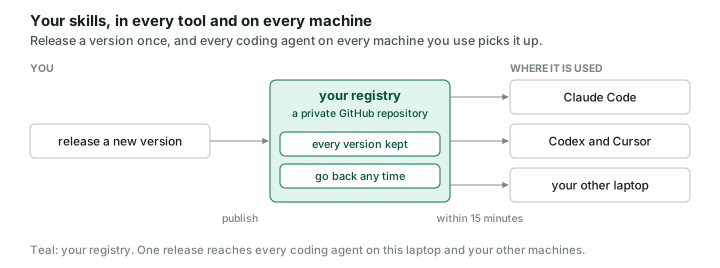
Your registry lives in a private GitHub repository. You release a new version there, and the CLI's background job brings it to every coding agent on each machine where you installed the registry.
Walk through it
The steps below build a personal registry named my-skills, with one namespace, personal. Replace <you> with your GitHub username. Install the aireg CLI first, as in the Quickstart, and sign in to the GitHub CLI with gh auth login.
1. Create a personal registry
Create a private repository on GitHub and initialize a registry in it.
gh repo create my-skills --private --clone && cd my-skills
aireg registry init --name my-skills --namespace personal -y
git add . && git commit -m "start my registry" && git push -u origin HEAD
--name sets the registry's name, which is how you refer to it in commands. --namespace creates the folder your skills and agents live in.
2. Bring in the skills you already have
Find the skills your coding agents already have, and copy them into your registry.
aireg status -g
aireg skill new --from ~/.claude/skills/pr-review --namespace personal
aireg registry index && git add . && git commit -m "release pr-review 0.1.0" && git push
aireg status -g lists, with each one's harness and path, the skills in your user scope's harness folders that nothing manages yet. aireg skill new --from copies existing skill folders into your namespace, each as version 0.1.0 of a new skill, and leaves the originals where they are.
3. Install them into every tool on this machine
First move the original you imported in step 2, ~/.claude/skills/pr-review, out of ~/.claude/skills. aireg add -g doesn't install over a folder of yours, so while the original is there, Claude Code keeps loading it instead of the copy the CLI manages. Then connect your registry for this machine and install the whole namespace.
aireg registry add github.com/<you>/my-skills -g
aireg add -g my-skills/personal
aireg daemon autostart on
-g installs into your user scope instead of a project, so every project on this machine gets the skills. Installing my-skills/personal takes every skill in the namespace, including ones added later. The CLI's background job checks for new versions every 15 minutes, and aireg daemon autostart on starts it when you log in.
4. Release an update
Improve a skill as a new version, and every tool on every machine where you installed the registry picks it up.
aireg skill bump pr-review minor --namespace personal
# edit artifacts/personal/skill/pr-review/0.2.0/SKILL.md
aireg registry index && git add . && git commit -m "release pr-review 0.2.0" && git push
aireg skill bump copies 0.1.0 into a new 0.2.0 folder. Version 0.1.0 stays in the registry, so you can always go back to it: aireg add -g my-skills/personal/pr-review@0.1.0 pins it, and aireg add -g my-skills/personal/pr-review takes the latest again.
5. Set up your second machine
Install the CLI as in the Quickstart, then connect the same registry.
aireg registry add github.com/<you>/my-skills -g
aireg add -g my-skills/personal
aireg daemon autostart on
Both machines now have every skill and agent in your registry, and each new version reaches them within 15 minutes.
6. Let your coding agent run it
Give your coding agent aireg's skills, then ask it to do any of the steps above.
aireg registry add github.com/atlanai/ai-registry --path examples/aireg -g
aireg add ai-registry/aireg -g
For example: "set up a registry for my skills" or "publish the skills in ~/.claude/skills to my registry".
7. Read a skill before you install it
Read a skill before you roll it out, to see exactly what it tells an agent to do. This is an aireg CLI command that installs nothing.
The full name gives the registry, namespace, and skill; add the kind, as in my-skills/personal/skill/pr-review, only when a skill and an agent share the name. A path works too, for a skill you have not published yet, as in aireg show ./my-new-skill. aireg show prints the artifact and writes nothing.
8. See everything on one screen
See what the aireg CLI has installed on this machine, which background jobs run, and your registries, in one terminal view.
Where to go next
-
Teams and organisations
One registry for a whole company.
-
Quickstart
Build your own registry, from install to background sync.