Example: acme-registry
This page walks through the example that the repository ships, examples/acme-registry, along with what happens within the registry during core tasks, including adding a skill, installing the skill across harnesses, and updating a skill.
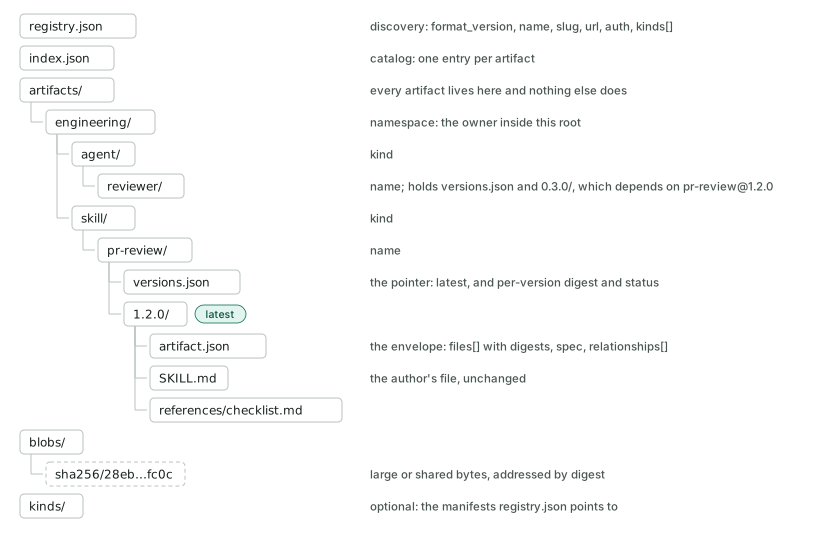
acme-registry is a complete root that follows the specification. It contains two kinds, skill and agent, with their manifests under kinds/, and one namespace, engineering. The engineering namespace contains two artifacts: a pr-review skill and a reviewer agent:
To follow along, copy the example into its own repository first:
git clone https://github.com/atlanai/ai-registry.git
cp -r ai-registry/examples/acme-registry acme-registry
cd acme-registry && git init && git add . && git commit -m "start from the acme example"
1. Adding a skill to the registry
Suppose the engineering team wants to add a new skill, run-benchmark, to the registry.
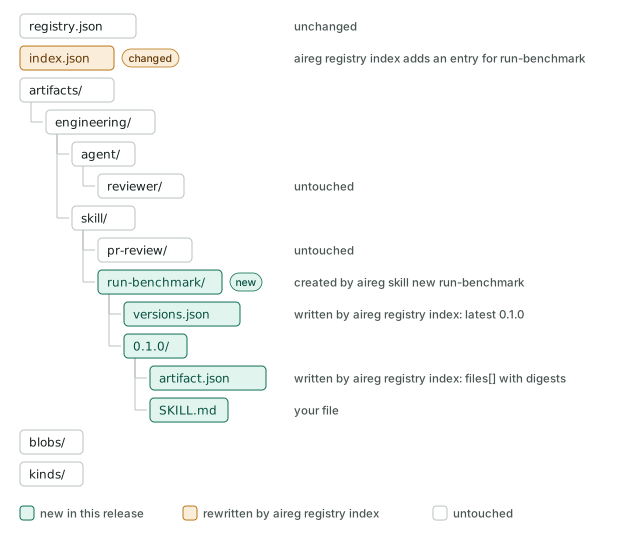
A client adds one folder and one file, and updates another. It creates artifacts/engineering/skill/run-benchmark/0.1.0/ with the skill's SKILL.md and an artifact.json that records a digest for every file, and that folder never changes again. It creates versions.json for run-benchmark, with 0.1.0 as its only version and as latest, and adds an entry for the skill to index.json. Nothing under pr-review/ or agent/ changes.
If you're using the aireg CLI, you would run:
aireg skill new run-benchmark --namespace engineering
# write the skill, including its description
aireg registry index
git add . && git commit -m "release run-benchmark 0.1.0"
2. Installing the skill into your harnesses
Suppose the engineering team wants to use run-benchmark in a project, in Claude Code and Codex.
A client finds the latest version of run-benchmark, checks each file against its digest, and puts the files where each harness looks for skills: .claude/skills/ for Claude Code and .agents/skills/ for Codex. It records the exact version it installed. The registry itself does not change.
If you're using the aireg CLI, you would create a project next to the registry and run:
cd .. && mkdir my-project && cd my-project && git init
aireg registry add ../acme-registry
aireg add acme/engineering/skill/run-benchmark
aireg list
1 installed in this project
  artifact       kind   version  from  harnesses
  run-benchmark  skill  0.1.0    acme  Claude Code, Codex
The CLI writes the skill's files into the project's .registry/ folder, links .claude/skills/ and .agents/skills/ to them (Codex reads .agents/skills/), and records the version and digests in .registry/manifest.lock.yml. To install it into your user scope instead, for every project on this machine, connect the registry with aireg registry add ../acme-registry -g and run aireg add -g acme/engineering/skill/run-benchmark. The CLI then keeps it current in the background.
3. Updating the skill
Suppose the engineering team improves run-benchmark and wants every project that uses it to get the new version.
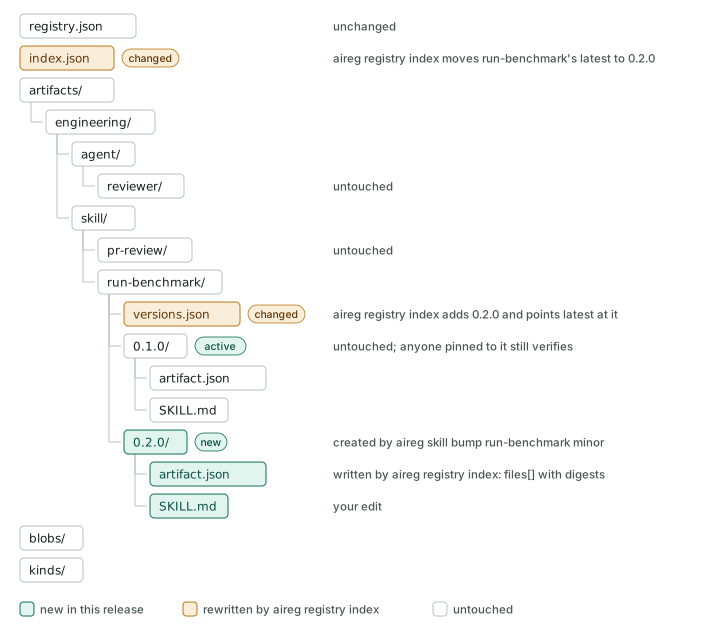
A client adds a new version folder, run-benchmark/0.2.0/, with the edited files and a new artifact.json, and leaves 0.1.0/ untouched so anything pinned to it keeps working. It adds 0.2.0 to versions.json, points latest at it, and updates the skill's entry in index.json. Clients that read the registry then see 0.2.0 as the latest version.
If you're using the aireg CLI, you would run, in the registry:
cd ../acme-registry
aireg skill bump run-benchmark minor --namespace engineering
# edit artifacts/engineering/skill/run-benchmark/0.2.0/SKILL.md
aireg registry index
git add . && git commit -m "release run-benchmark 0.2.0"
Then, in each project that uses it:
Because each harness folder links to the files in .registry/, Claude Code and Codex see 0.2.0 as soon as the update finishes. Installs in your user scope need no command: the CLI's background job takes 0.2.0 within 15 minutes. An install pinned to 0.1.0 stays there until you move the pin.